


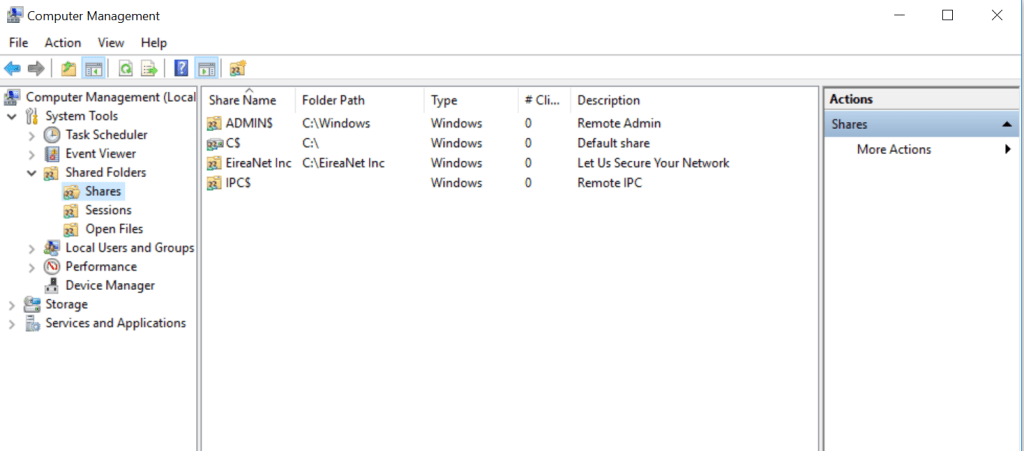


Disallow offline access to shares

Description
Determines whether the Offline Files feature is enabled for a shared folder on the device. Offline Files saves a copy of network files on the user’s device, which can be accessed when the computer is not connected to the network.
Potential risk
Files stored locally for offline access may contain sensitive information, and are at a higher risk in less protected and controlled environments, such as at home and in public places.
Remediation options
- Open computer management console (Start-> Run-> compmgmt.msc).
- Expand System Tools-> Shared Folders-> Shares.
- Open the misconfigured share’s properties (Select the share from the list, click the right mouse button, and click Properties).
- Click Offine Settings.
- Choose No files or programs from the shared folder are avilable offline.
- Press OK button.
Set folder access-based enumeration for shares
Description
Set access-based enumeration (ABE) on SMB shares to prevent users from seeing shared resources that they do not have permission to access
Potential risk
Networks often contains shared drives and folders that enabled users to access corporate data on systems across the network. As part of information gathering for attaks, Advarsaries may look for shares on remote systems to identify potential systems of interset for Lateral Movement
Remediation options
Following the following steps and guidelines:
- Launch SERVER MANAGER (Server 2012 and above)
- Click on FILE AND STORAGE SERVICES
- Click on SHARES
- Right click on each share you want to set Access-Based-Enumeration, select PROPERTIES
- Click SETTINGS
- Click ENABLE ACCESS BASED ENUMERATION
Remove share write permission set to ‘Everyone’
Description
Determines whether a shared folder has write permission set to ‘Everyone’ both in NTFS permission and share permission.
Potential risk
Sharing a folder with write permission to everyone can allow an attacker to replace legitimate files with malware to gain lateral movement in the network or cause damage.
Remediation options
following the following steps and guidelines:
- Remove write permission from ‘Everyone’
- Ensure that shares permissions to groups follow the “need-to-know” basis.
- It is recommended to grant permission to groups and not to specific user accounts







 EireaNet