




Securing Kubernetes components
Securing Kubernetes components is of utmost importance to keep your cluster running in an uncompromised manner. Below are a few recommendations to do this.

End-to-end TLS communications for etcd
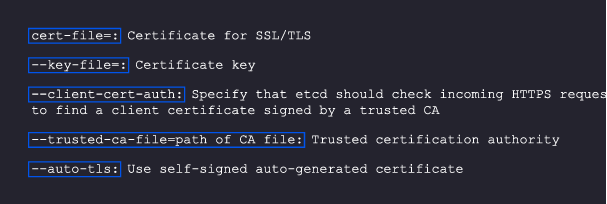
Apart from applications communicatingwith each other, Kubernetes components also have to talk with each other via TLS. You can use the code below to configure etcd for client-to-server communication on TLS:
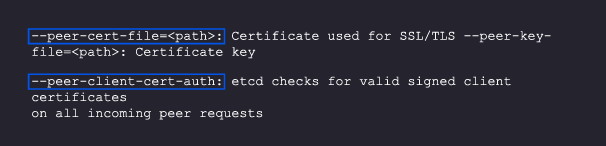
For server-to-server communication, you’ll need the following code:


Securing kubelets
A kubelet runs on each node and takes care of actions like creating a new pod, performing health checks on containers, and, if the containers are down, trying to spawn them again. It is also responsible for gathering and reporting metrics for running pods.
Kubelets expose some APIs that can be used to start and stop pods, and you will not want these APIs to be accessible from the outside. To lock them down, follow these steps
- Restrict the kubelet: Make sure that a kubelet in one node cannot access or make changes in other nodes. You can enable this setting in the admission controller’s configuration NodeRestriction configuration.
- Disable anonymous access: Use –anonymous-auth-false while starting the kubelet process so that you can block anonymous Access.
- Verify the authorization mode: Never run –authorization with AlwaysAllow.
- Shut down the read-only port: The –read-only-port=0 will not allow anyone to see what workload is running on the Kubernetes server; you can implement this in the reconnaissance phase

Securing the API server via third-party authentication
After etcd, the most critical Kubernetes component is the API server. If access to you API server is exposed to an attacker by mistake, it will be a disaster, as they will be able to make changes to all the resources you have in your cluster.
Tools like Dex, InfraHQ, Azure AD, and AWS IAM authenticator can be great alternatives to this authentication process. Make sure that your team refrains from sharing kubeconfig files amongst themselves since that will make it complicated to identify who made which changes; each kubeconfig file is marked with a user identifier, and sharing the files will create confusion.
Kubernetes network security
After securing your Kubernetes components, the next task is to make sure your network traffic s secure.

Network policies
Adding networking policies can go a long way. Initially, you generally don’t implement them and just allow all the services to talk to each other. But as you grow, your number of services can also grow exponentially and not having proper networking policies will create chaos. Adding policies like which services can access what resources or other services will help you maintain control over your infrastructure.
You may have to use a third-party CNI for this purpose. Calico, for starters, can be a great solution. Most service meshes also have this functionality, like Istio and Linkerd.

Monitoring traffic and communication
Next up, you need to monitor traffic to look for patterns and try to identify if there is unintended traffic coming in and out of any service. These can point to a leak in security that could cause issues.
Monitoring tools add a lot of value here. Solutions like Cilium´s Hubble give you a lot of visibility into your Kubernetes networking infrastructure.
Security of Kubernetes pods and other Kubernetes objects
In this section, we will talk about how to safeguard your Kubernetes workloads and different components, like pods, volumes, etc
Admission controllers and validating admission policies
Admission controllers are a great way to keep an eye on whatever is getting deployed on your Kubernetes clusters. They can intercept every configuration that you apply on a cluster, as well as modify or verify them. This capability is great for many use cases.
One very interesting controller is the validating admission policy controller. It offers a declarative way of creating a policy using the Common Expression Language (CEL). With this, you can apply your rules to all the resources created in Kubernetes clusters.
Below, we cover a few of the important rules you should apply in your cluster with a validating admission policy.
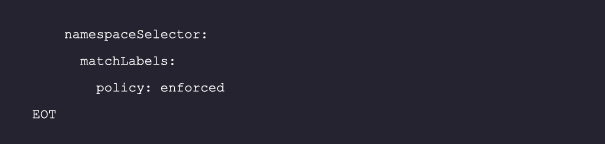
Deny deployment if privilege escalation is not set:
Allowing containers to run as root privileges can allow hackers to access your containers and exploit the node and hence the cluster. You can stop this with the following policy:
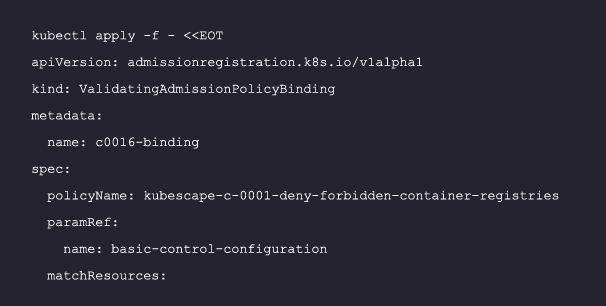
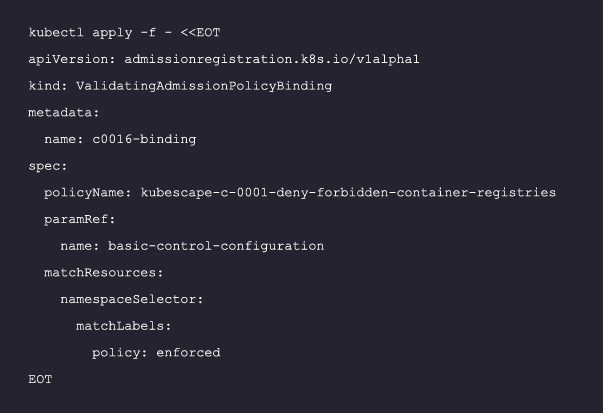
Forbid certain registries:
You don’t want your images for containers to be coming from untrusted or forbidden sources. This policy can help you make sure that you deny such repos:
Deny resources with a mutable container filesystem:
An attacker who has access to a container can download scripts in the filesystem and execute them. With an immutable filesystem, you can stop such malicious actors. Follow this binding to do so:
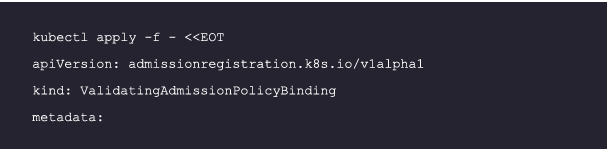
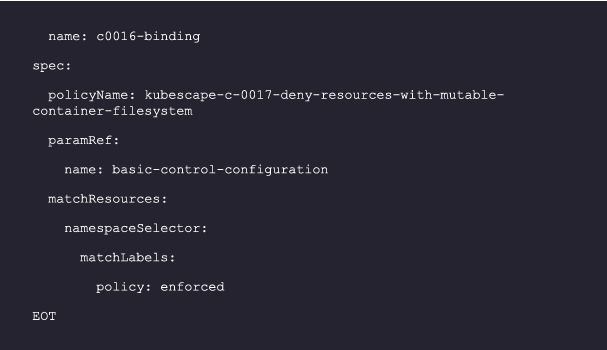
Additional policies can be found here including some very key ones you should consider applying:
- Mount service principle
- Linux hardening
- Privileged container
- Container runtime socket mounted
- Hostpath mount
- SSH server running inside containers
Process whitelisting
As the name suggests, this means you only allow certain processes to run in your Kubernetes nodes instead of allowing just anything to run. This can be a very tricky task, as every time a team has to deploy a new application, they have to get it whitelisted.
Kubernetes credentials and data security
After the container workload, you need to protect your data and security credentials. Below area few recommendations to achieve this.
Use secret managers
Kubernetes by default doesn’t encrypt your secrets, so anything you store in Kubernetes secrets can be viewed by anyone who has access to view them. In such cases, tools like Vault become really important to run your workload in the Kubernetes cluster. This lets you make sure that data no one should be able to see is safe.
Use a service account, not cloud provider credentials
If your workload wants to connect to a cloud provider, always use a service account to provide the permission required to do so, following the least privilege model. Also, make sure not to use cloud credentials in the Kubernetes configuration. Kubernetes natively does not support any mechanism to save your credentials in an encrypted manner. So, if you don’t have any secret management tools like Vault in your Kubernetes cluster, anyone who has access to the cluster can see your configs and secrets and abuse them.
Also for your service accounts, make sure that no other entity apart from the allowed pods have access to the resources.

Implement mTLS in service-to-service communication
TLS is not just for communicating with Kubernetes components. You should implement mTLS with your service-to-service communication so that anyone who has access to your network will not be able to see the data flowing through it. mTLS also makes sure that services are authorized to speak to each other by validating identity with AuthN and providing authorization via AuthZ, simplifying and securing communication between them.






 EireaNet