


Advanced practices for container security

Maintaining short-lived secrets
Secrets such as API keys, tokens, and credentials are a potential goldmine for attackers. To reduce the risk of exposure, it’s vital to rotate these secrets frequently.
For example, consider a cloud-based application that uses API keys for various services. If these keys are compromised, an attacker could gain unauthorized access. By rotating them every 30 to 90 days, you limit the window of opportunity for an attacker to do so.
Automated systems for secret rotation, like the open-source tool Vault by HashiCorp, can ensure that even if a secret is compromised, it won’t be valid for long. For instance, the following code will rotate secrets every 30 days :
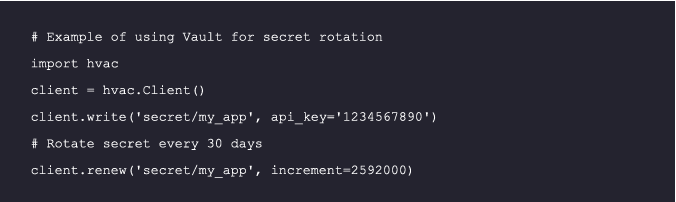
For more details, refer to the Vault Documentation

Secure service-to-service communication
In a containerized environment, containers often need to communicate with each other, making the security of such inter-container communication crucial. This is particularly true in a microservices architecture where multiple containers are constantly interacting.
A service mesh, such as the open-source tools Istio and Consul, can be employed to control the traffic between containers and prevent unauthorized access. These offer a specialized infrastructure layer designed to ensure safe, fast, and reliable communication between services. They are particularly useful in complex, large-scale microservices architectures.
One of the critical features of a service mesh is mutual TLS (mTLS), which provides secure communication between services. mTLS makes sure that traffic is both encrypted and originates from a trusted source, thereby guaranteeing the integrity and confidentiality of your data.
Consider the following diagram to understand the network flow with a service mesh:
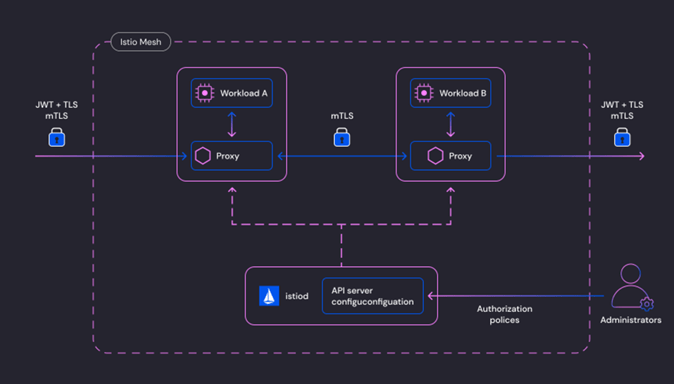
Figure1:Istio security architecture (source: Istio Docs)
By leveraging service meshes and mTLS, you can significantly enhance the security of service-to-service communication in your containerized applications.

Runtime security monitoring
Pre-runtime security measures like image scanning are essential but can’t catch threats that emerge during runtime. For example, a container might be compromised during runtime through a zero-day exploit. By implementing runtime security monitoring with eBPF-based tools like Tetragon, you can detect and prevent potential dangers, such as container breakouts or kernel exploits, in real-time.
Tetragon is a powerful open-source tool for observing security measures and enforcing them during runtime. It provides a wide range of use cases, including process lifecycle monitoring, file access monitoring, network observability, and Linux process credentials monitoring.
To illustrate how to use Tetragon for runtime security monitoring, let’s use the example below. We’ll be examining a kprobe that’s attached to the fd_install kernel function.
This particular kernel function, fd_install, is invoked whenever a file descriptor is added to a process’s file descriptor table, a scenario that’s commonly seen in system calls such as open or openat:
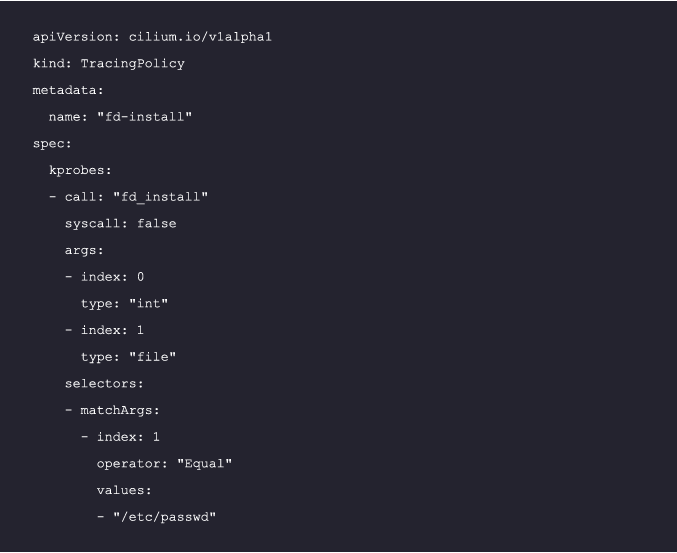
Please note that this is a simplified example, and Tetragon offers much more advanced
features and capabilities
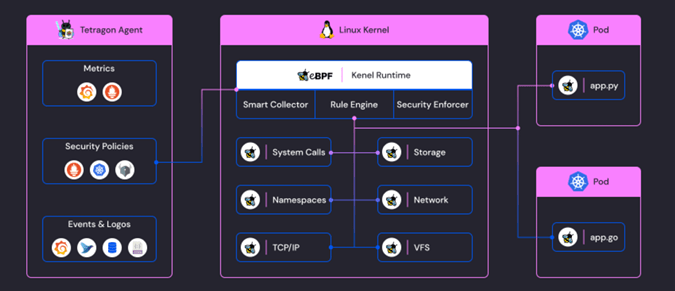
The diagram above visually represents how Tetragon uses eBPF to monitor different aspects of system and network activity, providing real-time security observability and enforcement. For more detailed examples, API references, and diagrams, please refer to the Tetragon documentation

Container intrusion detection
Intrusion detection systems (IDS) monitor your containers for signs of any malicious activity. For example, an IDS might detect an unusual spike in network traffic, indicating a potential breach. Using Tetragon, you can define tracing policies to detect intrusion attempts.
The following code illustrates a tracing policy that monitors TCP connection attempts. When a TCP connection attempt is detected, it outputs a formatted message with details about the source, destination, user, process, and container:
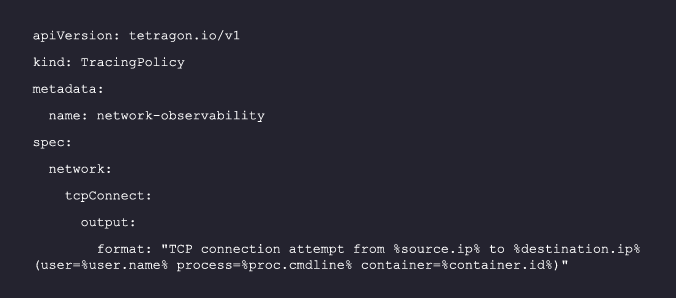
For more details, refer to the Tetragon documentation.

Zero trust architectures for containers
The “zero trust” principle dictates that no entity, internal or external, should be trusted by default. For example, even an internal service request should be thoroughly verified before access is granted. Implementing a zero-trust architecture in your container environment with open-source tools like OPA (Open Policy Agent) ensures that every request is verified, reducing the risk of breaches:
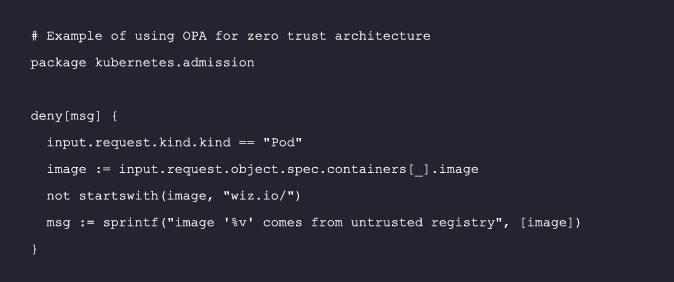
For More details, refer to the OPA Documentation

Implementing automated security policies
Manual security practices are prone to human error and can’t keep pace with containers’ dynamic nature. For example, a developer might accidentally expose a sensitive port due to a configuration error. Automated security policies, implemented with open-source tools like Open Policy Agent (OPA), can enforce security measures consistently and efficiently across your entire container environment, preventing such errors:
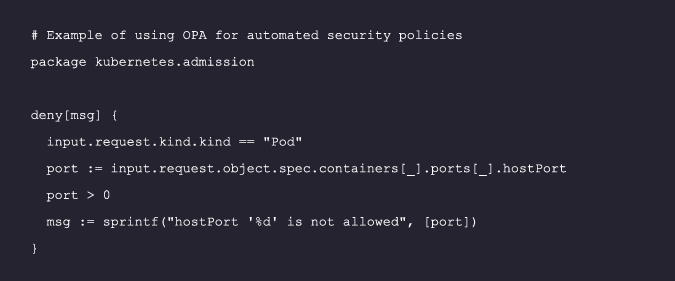
For More details, refer to the OPA Documentation

Admission Controllers
An admission controller is a crucial component of advanced container security. It enforces or blocks misconfigurations or bad behaviors before they reach the Kubernetes backend. For example, it can prevent the deployment of containers that run as root, thereby preventing potential security risks. Kubernetes provides a built-in admission controller that can be configured to meet your security needs:
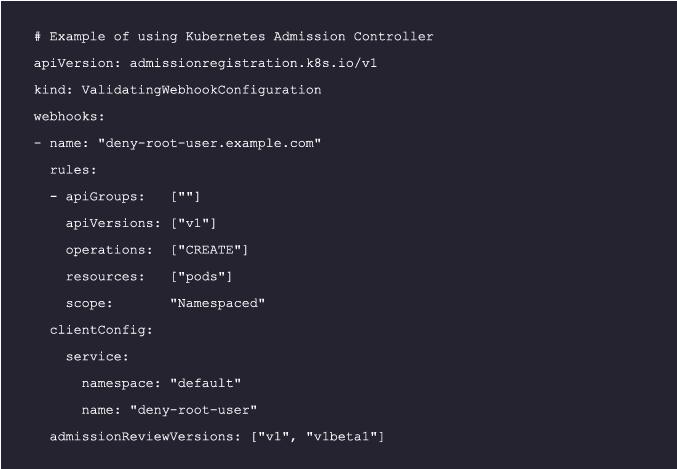
For More details, refer to the Kubernetes Admission Controllers Reference

Image Signing
Through open-source tools like Cosign or Notary, image signing allows for the digital signing of container images. For instance, an image might have been compromised and contain malicious code. Ensuring that only approved and verified images can be deployed adds an extra layer of security to your container environment.

For more details, refer to the Cosign documentation
Per advanced best practices, the leading open-source tools can be listed as follows:
Practice
Open-source tools
Short-lived secrets
Secure service-to-service communication
Runtime security monitoring
Container intrusion detection
Zero trust architectures for containers
Automated security policies
Admission controllers
Image signing
HashiCorp Vault, Kubernetes Secrets
Istio, Calico
Tetragon, Falco
Tetragon, Falco, Wazuh
Spiffe, Spire
Open Policy Agent, Kyverno
Kubernetes Dynamic Admission Controllers
Cosign, Notary
Container security practices based on environment
Securing your container environment requires a nuanced approach that takes into account the specific characteristics of your deployment environment. Whether you’re using Kubernetes, Docker, or another platform, there are particular practices you can follow to enhance your security posture, as shown in the table below:
Platform
Best Practices
Kubernetes
- Implement role-based access control (RBAC) to limit access to the Kubernetes API.
- Segregate your cluster into different namespaces to isolate applications from each other.
- Regularly update and patch your Kubernetes version to secure your environment against known vulnerabilities.
- Implement network policies to restrict traffic between pods.
- Enable audit logging to keep track of actions taken in your cluster.
- Implement resource quotas to prevent overconsumption of resources in a namespace.
- Leverage admission controllers to enforce specific behaviors in your cluster.
Platform
Best Practices
Docker
- Use Docker Bench for Security to check Docker configurations against best practices.
- Avoid running containers as root to limit potential privileges an attacker could exploit.
- Regularly update and patch Docker software for proper defense against known vulnerabilities.
- Use Docker’s built-in security features like seccomp profiles, AppArmor, and SELinux.
- Limit the use of Docker images to trusted sources.
- Use Docker Content Trust (DCT) to guarantee the validity and origin of all data obtained from a Docker registry.
- Implement resource limits to prevent a single container from consuming all the host resources.
- Use Docker’s logging features to monitor the activity of your containers.
Platform
Best Practices
OpenShift
- Use OpenShift’s built-in OAuth server for authentication to limit access to the OpenShift API.
- Implement role-based access control (RBAC) to manage who can perform what actions.
- Regularly update and patch your OpenShift environment to secure it against known vulnerabilities.
- Implement network policies to restrict traffic between pods.
- Enable audit logging to keep track of actions taken in your cluster.
- Use OpenShift Secrets to manage sensitive information.
- Implement resource quotas to prevent overconsumption of resources in a Project.
- Leverage OpenShift’s built-in security context constraints (SCCs) to control permissions for pods.
- Limit the use of images to trusted sources via image streams.
- Use OpenShift’s built-in health checks to monitor the state of your applications.
Platform
Best Practices
Cloud provider container
services
- Ensure that images are sourced from trusted repositories.
- Use best practices for container construction: Minimize the number of layers and avoid including unnecessary components, which can introduce vulnerabilities
- Regularly update the containers to ensure they have the latest security patches and updates.
- Restrict container IAM privileges and implement the principle of least privilege for container workloads.
- Restrict network access and use network policies to control permissions for inter-container communication.







 EireaNet